In March, we turn our buckets toward the brightest thing in the sky: The Moon. Up until now, we’ve been “hunting photons” from faint, distant galaxies and ghostly nebulae. But this month, we have the opposite problem. Sometimes, our light bucket gets too much rain. When the Moon is high and bright, it doesn’t just fill our bucket; it overflows, washing out the delicate details and leaving our eyes dazzled.
This month, we’re going to learn how to handle that overflow and use contrast to reveal the jagged shadows of lunar craters.
The “Flood” Factor: Why Less is More
When you point your telescope or high-powered binoculars at a nearly Full Moon, the sheer volume of light can actually be uncomfortable. It’s like trying to catch a waterfall in a teacup.
To see the Moon clearly, we have to “limit the rain.”
- The Moon Filter: This is essentially sunglasses for your telescope. A neutral density filter screws into the bottom of your eyepiece, cutting the brightness while keeping the color neutral.
- The “Aperture Mask”: Many telescopes come with a dust cap that has a smaller, secondary hole in it. By leaving the main cap on and only opening that small hole, you effectively shrink your “bucket,” allowing less light in and making the lunar surface much easier to look at for long periods.
Shadow Hunting: The Terminator Line
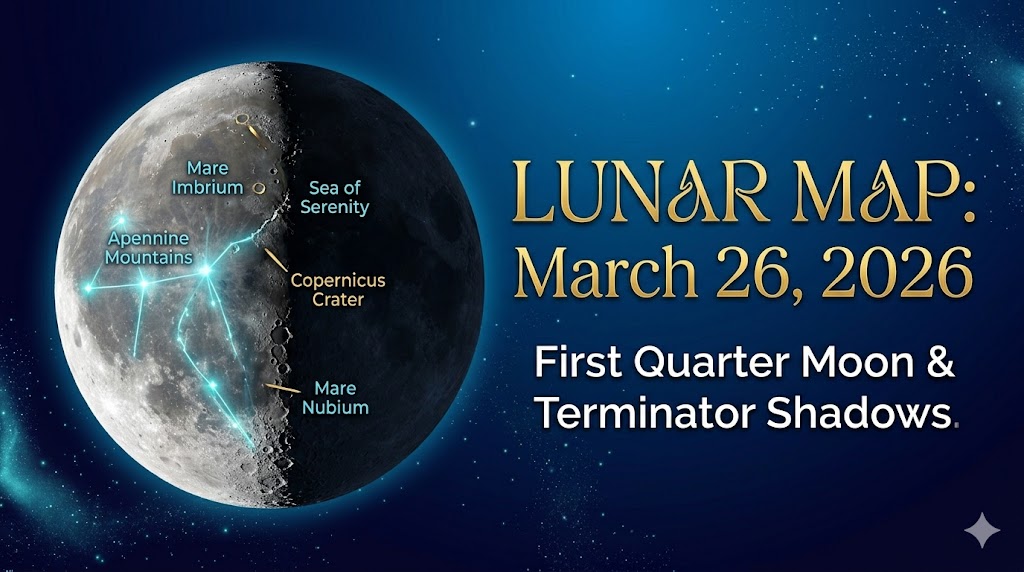
The biggest mistake beginners make is looking at the Moon when it’s Full. At Full Moon, the sunlight is hitting the lunar surface head-on, much like the sun at noon on Earth. This “washes out” the landscape, making it look flat and featureless.
The Secret: Look for the Terminator.
This is the line where day meets night on the Moon. Because the sun is hitting the surface at a low angle along this line, every mountain, crater rim, and canyon casts a long, jagged shadow.
- In March 2026: Look toward the Moon between March 24 and March 28. During this “First Quarter” phase, the terminator cuts right through the center of the Moon, highlighting the Apennine Mountains—a jagged range that looks like it belongs on the cover of a sci-fi novel.
Handing the Contrast: Tuning Your “Bucket”
To see the fine details of the lunar soil (the regalia), you need to manage contrast.
- Avert Your Eyes (Briefly): If the Moon is too bright, look away at a dark patch of sky for a few seconds to let your pupils reset, then go back to the eyepiece.
- High Magnification is Your Friend: Unlike with faint galaxies, the Moon loves magnification. By using a “stronger” eyepiece (a lower number like 9mm or 10mm), you spread the light out over a larger area. This naturally dims the view and lets you see individual boulders inside the craters.
March 2026 Light Bucket Target: The Crater Tycho
Look toward the southern limb of the Moon. You’ll see a massive crater with “rays” of white dust shooting out in all directions. This is Tycho.
- The Challenge: Can you see the tiny mountain peak right in the center of the crater? That’s the “Central Peak,” formed when the ground actually “splashed” back up after the initial impact millions of years ago.
Gear Guide: Mastering the Lunar Light
To help manage the “overflowing bucket,” here are my top recommendations:
- Celestron 1.25″ Moon Filter: An absolute necessity for any “Light Bucket” owner. It cuts glare and brings out the contrast in the highlands.
- Celestron Omni Barlow Lens (2x): This doubles the power of any eyepiece you own, letting you “zoom in” on those jagged shadows along the terminator.
For the “Light Bucket” astronomer using a smartphone, the challenge isn’t the camera’s quality—modern phones have incredible sensors—but rather the stability and alignment required to capture light through a telescope eyepiece.
Here are the essential gear suggestions to turn your smartphone into a high-performing astrophotography tool.
1. The Smartphone Digiscoping Adapter
This is the single most important piece of gear. Holding a phone by hand against a telescope eyepiece is nearly impossible for long-exposure shots.
- Top Pick: NexYZ 3-Axis Universal Smartphone Adapter
- Why it works: Unlike cheap clamps, this allows you to move the phone along the X, Y, and Z axes using precision knobs. This makes it easy to perfectly center the phone’s camera lens over the “exit pupil” of the telescope eyepiece.
2. Bluetooth Shutter Remote
Even a gentle tap on your phone’s screen to take a picture will cause the telescope to vibrate, resulting in a blurry moon or star.
- Recommendation: A simple Bluetooth Remote Shutter.
- Pro-Tip: If you don’t have a remote, use the timer function on your camera app (set it to 3 or 10 seconds). This allows the vibrations to settle after you press the button before the shutter actually opens.
3. Dedicated Astrophotography Apps
The “Auto” mode on most phones will try to overexpose the Moon, turning it into a white glowing ball. You need “Pro” or “Manual” mode to control ISO and Shutter Speed.
- iOS: NightCap Camera – It has dedicated modes for “ISS,” “Stars,” and “Meteor Showers.”
- Android: DeepSkyCamera – Designed specifically for taking “light frames” and “dark frames” for stacking later.
4. Specialized Eyepieces
Your “Light Bucket” needs an eyepiece that plays well with a camera lens.
- Long Eye Relief Eyepieces: Look for eyepieces with at least 15mm–20mm of eye relief. This provides enough space for your phone’s camera to “see” the entire field of view without a black ring (vignetting) around the image.
- Recommendation: Celestron Omni Series Plössl – These are affordable, provide great contrast for the Moon, and have a flat surface that makes mounting adapters much easier.
5. External Power Bank
Astrophotography apps and long-exposure “Night Modes” drain phone batteries extremely fast, especially in the cool night air of March and April.
- Suggestion: A small Portable Power Bank that you can Velcro-strap to your telescope tripod leg. This ensures your “bucket” stays powered throughout the entire session.
6. The “Secret Weapon”: A Red Film Filter
If you are using your phone to navigate star charts (like SkySafari), the blue light from the screen will ruin your night vision.
- Gear: Red Acetate Film.
- The Hack: Cut a piece to fit your phone screen and tape it on. Even “Night Mode” on apps often leaks enough white/blue light to shrink your pupils; a physical red filter is much more effective.
April Teaser
“Make sure to clean out your light bucket because next month, we are going to need every single rain drop. In April, we turn away from the bright objects and face the ultimate test: Faint Fuzzies. We will travel 35 million light-years to catch the ancient photons of the Leo Triplet galaxies and learn the final secret to seeing deep into the cosmos.”
 Stan's Hobbies and Interests